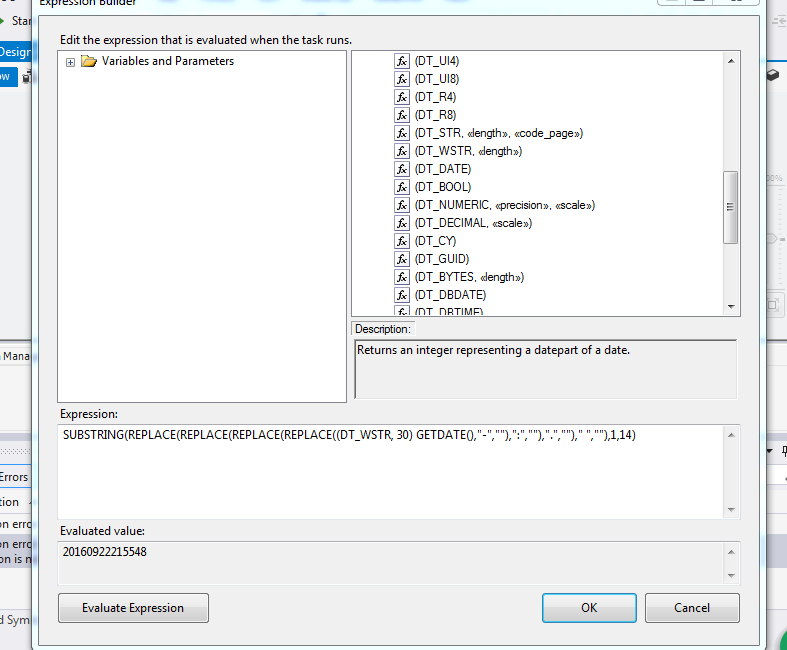
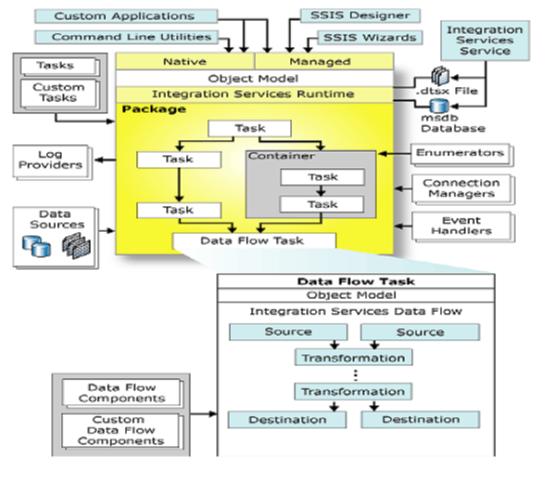
SELECT
(select convert(BIGINT, format(getdate(), 'yyyyMMddHHmmssf'))) as SessionID
,sysdatetime() as CurrentDate
,null ProcessStepSuccessMessage
,null ProcessStepErrorMessage
,null ObjectName
-----------------------------------
SELECT
'Load Gems Entity data into Staging' as ProcessStepName
,'Loading Gems Entity data into Staging failed' as ProcessStepErrorMessage
,'Loading Gems Entity data into Staging completed successfully' as ProcessStepSuccessMessage
-----------------------------------
EXECUTE TaxStage.[RECON].[prProcessExecution] ?,?,?,?,0,0,0,0,'In-Progress',null,null,null,? OUTPUT
-------------------------------------------------------------------------------------------------------------------
CREATE PROCEDURE [RECON].[prProcessExecution]
@SessionID bigint,
@ProcessStepName nvarchar(255),
@EffectiveStartDate datetime,
@EffectiveEndDate datetime,
@ExpectedRecordCount bigint,
@ActualRecordCount bigint,
@ExpectedAmountTotal numeric(25,7),
@ActualAmountTotal numeric(25,7),
@ProcessStepStatus nvarchar(255),
@ProcessLogMessage nvarchar(2048),
@ProcessErrorMessage nvarchar(2048),
@ObjectName nvarchar(512),
@ProcessExecutionID bigint OUT
--@RecordsProcessed int OUT
AS
declare @ProcTS datetime, @ProcessStepID bigint, @ProcessID bigint
declare @ProcessExecutionCount int, @ProcessStepCount int, @SessionCount int
SELECT @ProcTS = getdate(), @ProcessExecutionCount = 0, @ProcessStepCount = -1
-- Get Process Step ID
SELECT @ProcessStepID = max(ProcessStepID) from TaxStage.RECON.ProcessStep
where ProcessStepName = @ProcessStepName
-- Get Process ID
SELECT @ProcessID = max(ProcessID) from TaxStage.RECON.ProcessStep
where ProcessStepID = @ProcessStepID
select @SessionCount = count(*) from TaxStage.RECON.[Session] where SessionID = @SessionID
-- IF new session, then insert into Session table
IF @SessionCount = 0
BEGIN
INSERT INTO TaxStage.RECON.[Session]
SELECT top 1 @SessionID, @ProcessID, @ProcTS, NULL, 'In-Progress', @ProcTS, user, @ProcTS from TaxStage.RECON.[Session]
END
-- MERGE into Process Execution Table
MERGE TaxStage.RECON.ProcessExecution as pe
USING (
select top 1
@SessionID AS SessionID
,@ProcessStepID AS ProcessStepID
,@ProcTS AS StartTime
,@ProcTS AS EndTime
,@EffectiveStartDate AS EffectiveStartDate
,@EffectiveEndDate AS EffectiveEndDate
,@ExpectedRecordCount AS ExpectedRecordCount
,@ActualRecordCount AS ActualRecordCount
,@ExpectedAmountTotal AS ExpectedAmountTotal
,@ActualAmountTotal AS ActualAmountTotal
,@ProcessStepStatus AS ProcessStepStatus
,@ProcessLogMessage AS ProcessLogMessage
,@ProcessErrorMessage AS ProcessErrorMessage
,@ObjectName AS ObjectName
from RECON.ProcessExecution
where 1 = 1
) as stg
ON pe.SessionID = stg.SessionID
AND pe.ProcessStepID = stg.ProcessStepID
WHEN MATCHED THEN UPDATE SET
pe.[EndTime] = stg.[EndTime],
pe.[ActualRecordCount] = stg.[ActualRecordCount],
pe.[ActualAmountTotal] = stg.[ActualAmountTotal],
pe.ProcessStepStatus = stg.ProcessStepStatus,
pe.[ProcessLogMessage] = stg.[ProcessLogMessage],
pe.[ProcessErrorMessage] = stg.[ProcessErrorMessage],
pe.ObjectName = stg.ObjectName,
pe.LastUpdateTs = @ProcTS,
pe.EffectiveStartDate = stg.EffectiveStartDate,
pe.EffectiveEndDate = stg.EffectiveEndDate
WHEN NOT MATCHED THEN
INSERT(
[SessionID]
,[ProcessStepID]
,[StartTime]
,[EndTime]
,[EffectiveStartDate]
,[EffectiveEndDate]
,[ExpectedRecordCount]
,[ActualRecordCount]
,[ExpectedAmountTotal]
,[ActualAmountTotal]
,ProcessStepStatus
,[ProcessLogMessage]
,[ProcessErrorMessage]
,ObjectName
,[CreateTs]
,[LastUpdateUserID]
,[LastUpdateTs]
)
VALUES(
@SessionID
,@ProcessStepID
,@ProcTS
,@ProcTS
,@EffectiveStartDate
,@EffectiveEndDate
,@ExpectedRecordCount
,@ActualRecordCount
,@ExpectedAmountTotal
,@ActualAmountTotal
,@ProcessStepStatus
,@ProcessLogMessage
,@ProcessErrorMessage
,@ObjectName
,@ProcTS
,user
,@ProcTS
);
-- Derive Process Status for Session Table
SELECT @ProcessStepCount = COUNT(*) FROM RECON.ProcessStep where ActiveFlg = 'Y' and ProcessID = @ProcessID
SELECT @ProcessExecutionCount = COUNT(*) FROM RECON.ProcessExecution where SessionID = @SessionID
and ProcessStepStatus = 'Success'
IF @ProcessStepCount = @ProcessExecutionCount OR @ProcessStepStatus = 'Fail'
BEGIN
UPDATE TaxStage.RECON.[Session]
SET ProcessStatus = @ProcessStepStatus, [LastUpdateUserID] = user ,[LastUpdateTs] = @ProcTS, EndTime = @ProcTS
WHERE SessionID = @SessionID
END
ELSE
BEGIN
UPDATE TaxStage.RECON.[Session]
SET ProcessStatus = 'In-Progress', [LastUpdateUserID] = user ,[LastUpdateTs] = @ProcTS
WHERE SessionID = @SessionID
END
-- Return Process Execution ID
SELECT @ProcessExecutionID = max(ProcessExecutionID) from TaxStage.RECON.ProcessExecution
where ProcessStepID = @ProcessStepID
and SessionID = @SessionID
-----------------------------------------------------
EXECUTE TaxStage.[RECON].[prProcessExecution] ?,?,?,?,0,?,0,0,'Success',?,null,null,? OUTPUT
(select convert(BIGINT, format(getdate(), 'yyyyMMddHHmmssf'))) as SessionID
,sysdatetime() as CurrentDate
,null ProcessStepSuccessMessage
,null ProcessStepErrorMessage
,null ObjectName
-----------------------------------
SELECT
'Load Gems Entity data into Staging' as ProcessStepName
,'Loading Gems Entity data into Staging failed' as ProcessStepErrorMessage
,'Loading Gems Entity data into Staging completed successfully' as ProcessStepSuccessMessage
-----------------------------------
EXECUTE TaxStage.[RECON].[prProcessExecution] ?,?,?,?,0,0,0,0,'In-Progress',null,null,null,? OUTPUT
-------------------------------------------------------------------------------------------------------------------
CREATE PROCEDURE [RECON].[prProcessExecution]
@SessionID bigint,
@ProcessStepName nvarchar(255),
@EffectiveStartDate datetime,
@EffectiveEndDate datetime,
@ExpectedRecordCount bigint,
@ActualRecordCount bigint,
@ExpectedAmountTotal numeric(25,7),
@ActualAmountTotal numeric(25,7),
@ProcessStepStatus nvarchar(255),
@ProcessLogMessage nvarchar(2048),
@ProcessErrorMessage nvarchar(2048),
@ObjectName nvarchar(512),
@ProcessExecutionID bigint OUT
--@RecordsProcessed int OUT
AS
declare @ProcTS datetime, @ProcessStepID bigint, @ProcessID bigint
declare @ProcessExecutionCount int, @ProcessStepCount int, @SessionCount int
SELECT @ProcTS = getdate(), @ProcessExecutionCount = 0, @ProcessStepCount = -1
-- Get Process Step ID
SELECT @ProcessStepID = max(ProcessStepID) from TaxStage.RECON.ProcessStep
where ProcessStepName = @ProcessStepName
-- Get Process ID
SELECT @ProcessID = max(ProcessID) from TaxStage.RECON.ProcessStep
where ProcessStepID = @ProcessStepID
select @SessionCount = count(*) from TaxStage.RECON.[Session] where SessionID = @SessionID
-- IF new session, then insert into Session table
IF @SessionCount = 0
BEGIN
INSERT INTO TaxStage.RECON.[Session]
SELECT top 1 @SessionID, @ProcessID, @ProcTS, NULL, 'In-Progress', @ProcTS, user, @ProcTS from TaxStage.RECON.[Session]
END
-- MERGE into Process Execution Table
MERGE TaxStage.RECON.ProcessExecution as pe
USING (
select top 1
@SessionID AS SessionID
,@ProcessStepID AS ProcessStepID
,@ProcTS AS StartTime
,@ProcTS AS EndTime
,@EffectiveStartDate AS EffectiveStartDate
,@EffectiveEndDate AS EffectiveEndDate
,@ExpectedRecordCount AS ExpectedRecordCount
,@ActualRecordCount AS ActualRecordCount
,@ExpectedAmountTotal AS ExpectedAmountTotal
,@ActualAmountTotal AS ActualAmountTotal
,@ProcessStepStatus AS ProcessStepStatus
,@ProcessLogMessage AS ProcessLogMessage
,@ProcessErrorMessage AS ProcessErrorMessage
,@ObjectName AS ObjectName
from RECON.ProcessExecution
where 1 = 1
) as stg
ON pe.SessionID = stg.SessionID
AND pe.ProcessStepID = stg.ProcessStepID
WHEN MATCHED THEN UPDATE SET
pe.[EndTime] = stg.[EndTime],
pe.[ActualRecordCount] = stg.[ActualRecordCount],
pe.[ActualAmountTotal] = stg.[ActualAmountTotal],
pe.ProcessStepStatus = stg.ProcessStepStatus,
pe.[ProcessLogMessage] = stg.[ProcessLogMessage],
pe.[ProcessErrorMessage] = stg.[ProcessErrorMessage],
pe.ObjectName = stg.ObjectName,
pe.LastUpdateTs = @ProcTS,
pe.EffectiveStartDate = stg.EffectiveStartDate,
pe.EffectiveEndDate = stg.EffectiveEndDate
WHEN NOT MATCHED THEN
INSERT(
[SessionID]
,[ProcessStepID]
,[StartTime]
,[EndTime]
,[EffectiveStartDate]
,[EffectiveEndDate]
,[ExpectedRecordCount]
,[ActualRecordCount]
,[ExpectedAmountTotal]
,[ActualAmountTotal]
,ProcessStepStatus
,[ProcessLogMessage]
,[ProcessErrorMessage]
,ObjectName
,[CreateTs]
,[LastUpdateUserID]
,[LastUpdateTs]
)
VALUES(
@SessionID
,@ProcessStepID
,@ProcTS
,@ProcTS
,@EffectiveStartDate
,@EffectiveEndDate
,@ExpectedRecordCount
,@ActualRecordCount
,@ExpectedAmountTotal
,@ActualAmountTotal
,@ProcessStepStatus
,@ProcessLogMessage
,@ProcessErrorMessage
,@ObjectName
,@ProcTS
,user
,@ProcTS
);
-- Derive Process Status for Session Table
SELECT @ProcessStepCount = COUNT(*) FROM RECON.ProcessStep where ActiveFlg = 'Y' and ProcessID = @ProcessID
SELECT @ProcessExecutionCount = COUNT(*) FROM RECON.ProcessExecution where SessionID = @SessionID
and ProcessStepStatus = 'Success'
IF @ProcessStepCount = @ProcessExecutionCount OR @ProcessStepStatus = 'Fail'
BEGIN
UPDATE TaxStage.RECON.[Session]
SET ProcessStatus = @ProcessStepStatus, [LastUpdateUserID] = user ,[LastUpdateTs] = @ProcTS, EndTime = @ProcTS
WHERE SessionID = @SessionID
END
ELSE
BEGIN
UPDATE TaxStage.RECON.[Session]
SET ProcessStatus = 'In-Progress', [LastUpdateUserID] = user ,[LastUpdateTs] = @ProcTS
WHERE SessionID = @SessionID
END
-- Return Process Execution ID
SELECT @ProcessExecutionID = max(ProcessExecutionID) from TaxStage.RECON.ProcessExecution
where ProcessStepID = @ProcessStepID
and SessionID = @SessionID
-----------------------------------------------------
EXECUTE TaxStage.[RECON].[prProcessExecution] ?,?,?,?,0,?,0,0,'Success',?,null,null,? OUTPUT